Free Starbucks Calorie Calculator
Complete menu • 130+ items • Accurate nutrition
Starbucks Calorie Calculator:
The Complete Guide to Tracking Every Sip
Everything you need to know about using a Starbucks calorie calculator — hot drinks, iced coffee, Frappuccinos, seasonal picks, and fully custom orders.
A Starbucks calorie calculator estimates the total calories in any Starbucks drink by adding up the base drink calories, milk type, syrup pumps, and toppings. A plain Grande cold brew has 5 calories; a Venti Java Chip Frappuccino with whipped cream can exceed 600 calories. The fastest way to get an exact count is to use our interactive Starbucks calorie calculator above — or follow the step-by-step method in Section 3 below.
You pull up to the Starbucks drive-through, rattle off a complicated order — a Grande iced caramel macchiato with oat milk, two extra pumps of vanilla, light ice, and whipped cream — and the barista hands you a beautiful cup. But do you actually know how many calories just walked out that window with you?
For millions of health-conscious coffee lovers, the answer is: not really. That gap in awareness is exactly why a Starbucks calorie calculator is one of the most practical tools any Starbucks fan can use. A single customized drink can range from a modest 5 calories (plain black cold brew) to a staggering 800+ calories (a large Frappuccino loaded with extras). Both come in the same green cup — the Starbucks calorie calculator is what reveals the difference.
In this guide, we cover everything: how to use a Starbucks calorie calculator, how to calculate Starbucks calories for custom orders, which drinks are highest and lowest in calories, how milk and syrups stack up, and practical strategies to cut calories without cutting flavour.
Why Calorie Tracking at Starbucks Actually Matters
Many people underestimate liquid calories — and Starbucks beverages are a prime example. Unlike food, drinks are consumed quickly and without the same satiety cues. A 500-calorie Frappuccino can vanish in five minutes, leaving you no fuller than before, yet accounting for a quarter of a typical daily calorie budget.
Starbucks is the world’s largest coffeehouse chain, with over 35,000 locations globally. That scale means the impact of Starbucks drink calories on dietary habits is enormous. A reliable Starbucks calorie calculator puts you back in control. It helps you:
- Understand exactly what you consume with every customization
- Compare options before you order, not after you’ve finished the drink
- Make swaps — like changing milk type or removing a syrup pump — that save 100–200 calories per visit
- Track Starbucks calories alongside the rest of your daily nutrition using apps like MyFitnessPal
- Avoid calorie surpluses that build silently over weeks and months
“A daily 200-calorie surplus from Starbucks drinks alone can add up to nearly 1.5 pounds of extra weight in a single month — visible only when you use a Starbucks calorie calculator consistently.”
How a Starbucks Calorie Calculator Works
A Starbucks calorie calculator is a digital tool that estimates the calorie count of any Starbucks drink, standard or custom. The best Starbucks coffee calorie calculator tools allow you to input every variable:
- Drink type (latte, Frappuccino, cold brew, tea, etc.)
- Size (Tall, Grande, Venti, Trenta)
- Milk type (whole, 2%, oat, almond, coconut, soy, nonfat)
- Number of espresso shots
- Syrup choices and pump counts
- Toppings: whipped cream, caramel drizzle, cold foam, java chips
- Temperature: iced vs. hot
When you enter all these variables, the Starbucks calorie calculator cross-references a nutritional database built from Starbucks’ own published menu data, then outputs an estimated calorie total for your exact configuration. You can also use a Starbucks macro calculator to see not just calories but protein, fat, and carbohydrate totals for any drink.
The Calorie Components of Any Starbucks Drink
Every Starbucks calorie calculator breaks a drink down into its core calorie-contributing components:
| Ingredient Component | Low-Cal Range | High-Cal Range |
|---|---|---|
| Espresso shot (each) | 5 cal | 10 cal |
| Milk base (8 oz portion) | 30–45 cal (nonfat) | 150 cal (whole) |
| Flavoured syrup (per pump) | 20 cal | 25 cal |
| Whipped cream | 70 cal | 110 cal |
| Caramel or mocha drizzle | 15 cal | 30 cal |
| Cold foam topping | 35 cal | 80 cal |
| Frappuccino base syrup | 90 cal | 140 cal |
How to Calculate Starbucks Calories: Step-by-Step Method
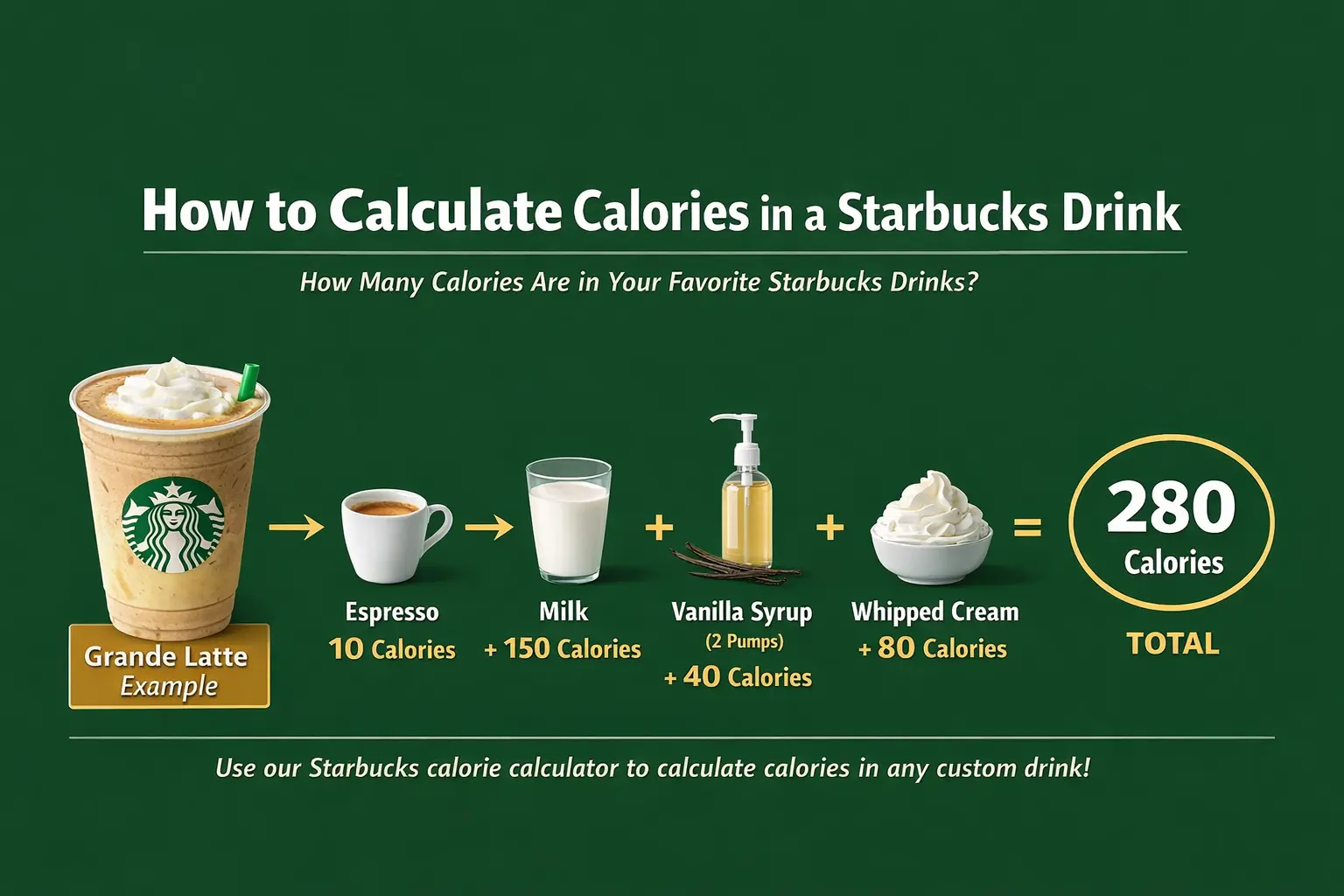
If you want to calculate Starbucks calories manually without a dedicated tool, follow this five-step method that mirrors what every Starbucks calorie calculator does under the hood:
Milk Calorie Reference Table (Grande, ~12 oz)
| Milk Type | Approx. Calories | vs. 2% Milk (default) |
|---|---|---|
| Nonfat (skim) milk | ~120 cal | −60 cal |
| 2% reduced fat (default) | ~180 cal | — |
| Whole milk | ~220 cal | +40 cal |
| Oat milk | ~170 cal | −10 cal |
| Soy milk | ~130 cal | −50 cal |
| Coconut milk | ~80 cal | −100 cal |
| Almond milk | ~60 cal | −120 cal |
Starbucks Drink Calorie Calculator: Breakdown by Category
All values below are approximate, based on standard preparation for a Grande (16 oz) size. Use these as a starting point in any Starbucks calorie calculator, then adjust for your customizations.
☕ Espresso-Based Hot Drinks
| Drink | Standard Calories (Grande) | With Nonfat Milk |
|---|---|---|
| Caffè Latte (2% milk) | 190 cal | 130 cal |
| Cappuccino (2% milk) | 140 cal | 80 cal |
| Vanilla Latte | 250 cal | 190 cal |
| Caramel Macchiato | 250 cal | 180 cal |
| White Chocolate Mocha + Whip | 430 cal | 360 cal |
| Caffè Mocha + Whip | 370 cal | 300 cal |
| Pumpkin Spice Latte + Whip | 380 cal | 310 cal |
🌊 Iced Coffee and Cold Brew
| Drink | Calories (Grande) | Notes |
|---|---|---|
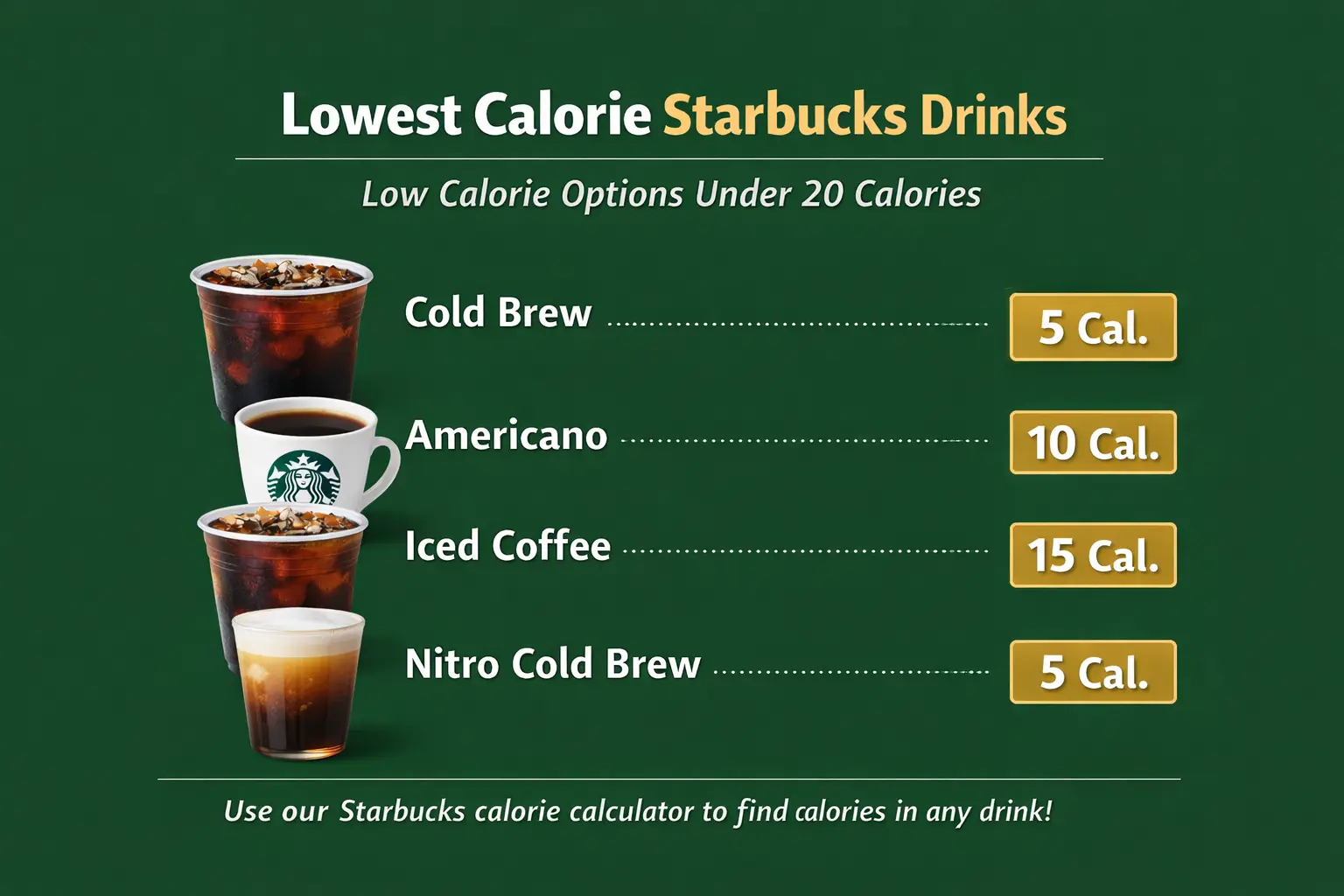
| Cold Brew (black) | 5 cal | Almost zero calorie |
| Iced Coffee (black, unsweetened) | 15 cal | Very low calorie |
| Iced Caramel Macchiato (2%) | 250 cal | Standard pumps |
| Iced Vanilla Latte (oat milk) | 230 cal | Oat adds richness |
| Iced Brown Sugar Oat Shaken Espresso | 200 cal | Popular choice |
| Nitro Cold Brew (plain) | 5 cal | Zero calorie base |
| Cold Brew + Sweet Cream Cold Foam | 200 cal | Foam adds ~100 cal |
🥤 Frappuccinos — The Calorie Champions
When you use a Starbucks calorie calculator for a Frappuccino order, be prepared for the numbers. Frappuccinos are the highest-calorie category on the menu, combining a sugar-laden base, whole or 2% milk, flavour syrups, and almost always whipped cream. The Starbucks calorie calculator becomes especially valuable here because small modifications create large calorie swings.
| Frappuccino | Calories (Grande, standard) | With Nonfat + No Whip |
|---|---|---|
| Java Chip Frappuccino | 460 cal | 320 cal |
| Caramel Frappuccino | 380 cal | 270 cal |
| Mocha Frappuccino | 370 cal | 260 cal |
| Vanilla Bean Crème Frappuccino | 400 cal | 290 cal |
| Matcha Crème Frappuccino | 420 cal | 300 cal |
| Green Tea Frappuccino + Whip | 430 cal | 310 cal |
| Strawberry Acai Lemonade Refresher | 140 cal | N/A — no milk |
Switching from whole milk to nonfat and removing whipped cream on a Java Chip Frappuccino saves approximately 140 calories. Run this in any Starbucks calorie calculator to see the exact impact before you order.
Starbucks Calories Calculator for Custom Drinks
The most powerful feature of any Starbucks calories calculator is the ability to calculate calories for fully custom orders — the kind you whisper to a barista or find on a TikTok trend. Here are three popular custom drinks with full calorie breakdowns, showing exactly what a Starbucks calorie calculator custom order looks like in practice:
See the Lowest Calorie Starbucks Drinks →
The Syrup Factor: What Every Starbucks Calorie Calculator Tracks
Syrups are the most commonly overlooked calorie source when people try to calculate Starbucks drink calories. Most people ask for “extra pumps” without realizing the arithmetic. Every accurate Starbucks calorie calculator tracks syrups pump by pump — here is why that matters:
| Syrup Type | Cal/Pump | Tall (3p) | Grande (4p) | Venti (5p) |
|---|---|---|---|---|
| Classic Simple Syrup | 20 | 60 | 80 | 100 |
| Vanilla Syrup | 20 | 60 | 80 | 100 |
| Caramel Syrup | 20 | 60 | 80 | 100 |
| Hazelnut Syrup | 20 | 60 | 80 | 100 |
| Brown Sugar Syrup | 20 | 60 | 80 | 100 |
| White Mocha Sauce | 30 | 90 | 120 | 150 |
| Mocha Sauce | 25 | 75 | 100 | 125 |
| Sugar-Free Vanilla | 0 | 0 | 0 | 0 |
Sugar-free syrups (vanilla, hazelnut, caramel, cinnamon dolce, and mocha at most locations) eliminate syrup calories entirely. This is one of the most powerful levers in the Starbucks calorie calculator — swapping four pumps of vanilla for sugar-free vanilla saves 80 calories instantly, with no change to sweetness.
Starbucks Calorie Calculator for Seasonal Menu Drinks
Starbucks’ seasonal menus generate some of the most anticipated — and most calorie-dense — drinks of the year. If you rely on a Starbucks calorie calculator for everyday orders, you especially need it for seasonal picks, since these drinks often include proprietary sauces and toppings not found on the regular menu.
🍂 Fall Seasonal (Grande Calories)
- Pumpkin Spice Latte + Whip — ~380 cal
- Pumpkin Cream Cold Brew — ~250 cal
- Apple Crisp Oat Milk Shaken Espresso — ~270 cal
- Salted Caramel Mocha Frappuccino + Whip — ~470 cal
❄️ Winter Seasonal (Grande Calories)
- Peppermint Mocha + 2% + Whip — ~400 cal
- Toasted White Chocolate Mocha + Whip — ~420 cal
- Caramel Brulée Latte + Whip — ~410 cal
- Sugar Cookie Almond Milk Latte — ~270 cal
Always run a seasonal drink through a Starbucks calorie calculator before your first order of the season. Seasonal drinks frequently include 2–3 extra syrup pumps compared to their non-seasonal equivalents — a hidden source of 40–90 extra calories per drink.
How to Reduce Calories at Starbucks Without Ruining Your Drink
A Starbucks calorie calculator is only useful if it leads to actionable changes. Once you know your drink’s calorie total, these are the highest-impact modifications — ranked from most to least effective — that you can model in any Starbucks calorie calculator before you order:
Choose Lower-Calorie Milk
Going from whole to almond milk saves 120–160 calories — the single highest-impact swap in any Starbucks calorie calculator.
Remove Whipped Cream
Skipping whipped cream saves 70–110 calories instantly with no impact on the core flavour of the drink.
Reduce Syrup Pumps
Dropping from 4 to 2 pumps saves 40 calories per drink — a small change that compounds daily.
Use Sugar-Free Syrups
Switching to sugar-free syrup eliminates all syrup calories. Combined with lower-cal milk, this saves 150+ calories per order.
Order Smaller
Tall instead of Grande reduces milk, syrup pumps, and toppings simultaneously — saving 60–100 calories per drink.
Order “Light” Frappuccino
The light Frappuccino base reduces sugar significantly. Java Chip Light: ~280 cal vs. 460 cal standard.
Switch to Cold Brew
Plain cold brew: 5 calories. With sweet cream cold foam: ~200 cal. vs. 380 cal for a standard Caramel Frappuccino.
Switching from a daily Grande Caramel Frappuccino (380 cal) to a Grande Cold Brew with Vanilla Sweet Cream Cold Foam (200 cal) saves 180 calories every day — 1,260 calories per week. Your Starbucks calorie calculator makes this comparison instant.
For a curated list of pre-verified low-calorie orders, see our guide to Starbucks drinks under 100 calories — every drink on that list has been confirmed using the same calorie calculation method outlined above.
Using the Starbucks App as Your Built-In Calorie Calculator
The official Starbucks app functions as a built-in Starbucks calorie calculator for any drink you customize through the order screen. Here is how to use it effectively alongside a dedicated Starbucks calorie calculator app:
- Open the Starbucks app and navigate to the Order section.
- Select your drink category and specific drink.
- Tap the drink to open the customization panel.
- As you adjust each parameter — milk type, syrup pumps, size, toppings — the calorie count updates in real time.
- Before finalizing, review the calorie count displayed beneath the drink name.
- If the calorie count exceeds your target, continue modifying until you reach your desired range.
The in-app Starbucks calorie calculator only covers officially listed menu drinks. For fully custom or secret-menu orders, you will need to calculate manually using the method in Section 3, or use a third-party Starbucks calorie calculator that supports full customization.
Frequently Asked Questions: Starbucks Calorie Calculator
Starbucks Calorie Calculator: Canada & International Visitors
For customers outside the US, calorie counts are generally consistent with American locations since Starbucks uses standardized global recipes. A Starbucks calorie calculator built on US nutritional data is reliable for most international markets, with minor regional variations:
United States
FDA mandates calorie display on all menus. Most comprehensive calorie data available via the app and official website — the gold standard for any Starbucks calorie calculator.
Canada
Follows the same nutritional standards as the US. The Starbucks Canada app yields nearly identical calorie results to a US-based Starbucks calorie calculator.
UK & Europe
Calories shown in kcal (same unit as “calories” in everyday usage). Some seasonal flavours or syrups may differ slightly from the US menu.
Asia-Pacific
Regional menus vary more significantly. Use the local Starbucks app for the most accurate calorie information in these markets rather than a US-centric Starbucks calorie calculator.
Building Smarter Starbucks Habits With a Calorie Calculator
The goal of using a Starbucks calorie calculator is not to eliminate joy from your coffee experience — it is to empower you to make choices that align with your personal health and fitness goals. You don’t need a cheat day to enjoy Starbucks; you just need the right numbers in front of you.
Instead of thinking “I can’t have that Frappuccino,” think: “I can have a modified version of that Frappuccino that fits my goals today.” A Caramel Frappuccino with nonfat milk, no whipped cream, and light caramel drizzle is still a Caramel Frappuccino — it just has about 200 fewer calories than the standard version. A Starbucks calorie calculator shows you this gap before you decide.
- Use the Starbucks app or a third-party Starbucks calorie calculator to preview your drink before ordering — especially for new or seasonal items.
- Establish a few “go-to” customized orders that you know hit a calorie target you are comfortable with, so you are not starting from scratch every visit.
- Reserve high-calorie drinks (Frappuccinos, specialty lattes with extra sauces) for genuine treat occasions rather than everyday consumption.
- Track Starbucks calories as part of your overall daily nutrition log using apps like MyFitnessPal, Cronometer, or Lose It! — all of which have Starbucks menu items in their databases.
- Experiment with plant-based milks like oat or almond — not just for calorie savings, but for flavour discovery. Many people prefer the taste of coffee with these alternatives once they try them.
- Use a Starbucks calorie calculator to compare your regular order against the same drink in a smaller size or with one fewer syrup pump — even a 50-calorie reduction per day adds up to 350 calories per week.
Make Every Starbucks Order Count
Whether you are using the official Starbucks app, a third-party Starbucks calorie calculator, or manually working through the numbers with this guide, you now have everything you need to make every coffee run an informed decision. The right Starbucks calorie calculator is the bridge between guessing and knowing — one sip at a time.
Try the Free Starbucks Calorie Calculator ↑